Reverse engineering a Beyblade launch tracker
At the beginning of June last summer, after resetting my Instagram algorithm for the 10th time that year, I started getting recommendations for something I hadn't heard of or seen since I was a kid: Beyblades. This new generation, called Beyblade X, was genuinely hypnotic to watch on reels, and I was instantly hooked. So, I decided to pay a visit to my local toy shop in Dublin, where I picked up a stadium and a bunch of beys. That same weekend, I called a few friends and organised a games night at my place. It didn't take long for us to understand what all the fuss was about!
Beyblade X battles are incredibly fun and fast paced compared to previous generations of the toy line. Thanks to the stadium's design, the bottom part of each top, known as the Bit, can latch onto a side rail and trigger a special "gimmick" called Xtreme Dash. The resulting collisions between the beys are absolutely epic! Everyone was ecstatic as we watched these tops fly left and right around the stadium in my living room.
Over the following months, I attended local tournaments, made new friends, and collected far too many Beyblades. Just like everyone else, I wanted to find the ultimate meta combos (Blades + Ratchets + Bits). During one of my procrastination-fuelled research sessions, I stumbled upon an interesting accessory called the Beybattle Pass (BX-09). From what I could gather online, it was developed by Takara Tomy and was (in theory) only available in Japan. When attached to a launcher, it could connect to an official mobile app via Bluetooth and transmit data from each launch, specifically the Shoot Power value, which is literally just the RPM (revolutions per minute) of the launch. Users could then accumulate points and use them to enter a Japan-exclusive lottery system for a chance to obtain rarer Beyblades.
I was fascinated by how this little gadget worked, and with a bit of patience, I managed to find one on eBay Japan, although at an unfortunate scalper price.
How does the Beybattle Pass work?
Here is a quick breakdown of how it works. Some of this is based on hands-on testing. Since this device was so expensive, I wasn't about to tear it apart and risk breaking it! Still, it was pretty straightforward to figure out how key parts operate.
Official Beyblade X launchers (such as the string launcher shown in the video) have two holes on the top. Inside the first hole is a small rotating disc that changes color from black to white depending on how quickly you pull the string.
Let's look at the bottom part now:
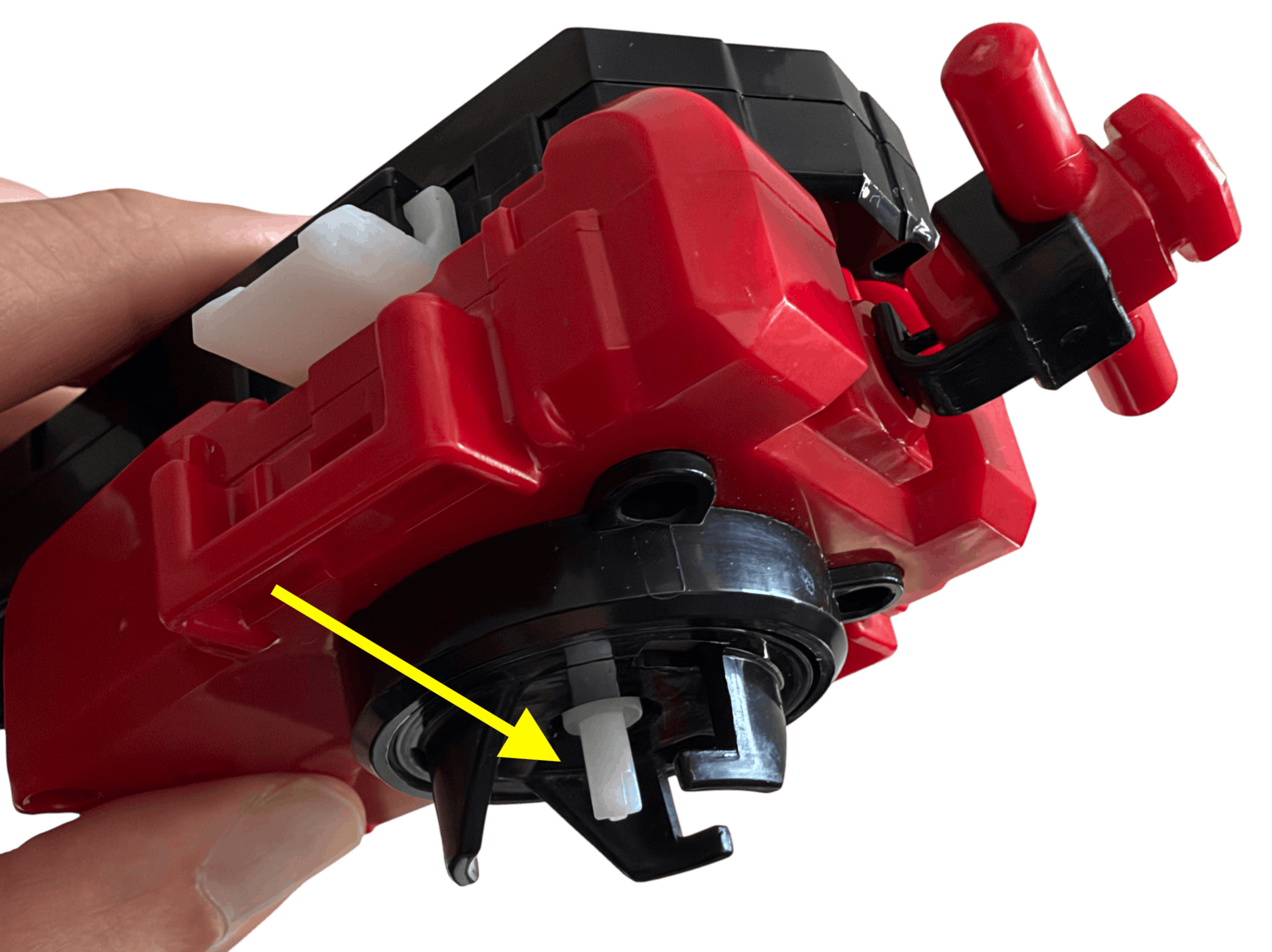
When you attach a Beyblade to the three hooks at the bottom you will also push a little white lever to the top, this little lever will come out from the second hole (blue arrow below):
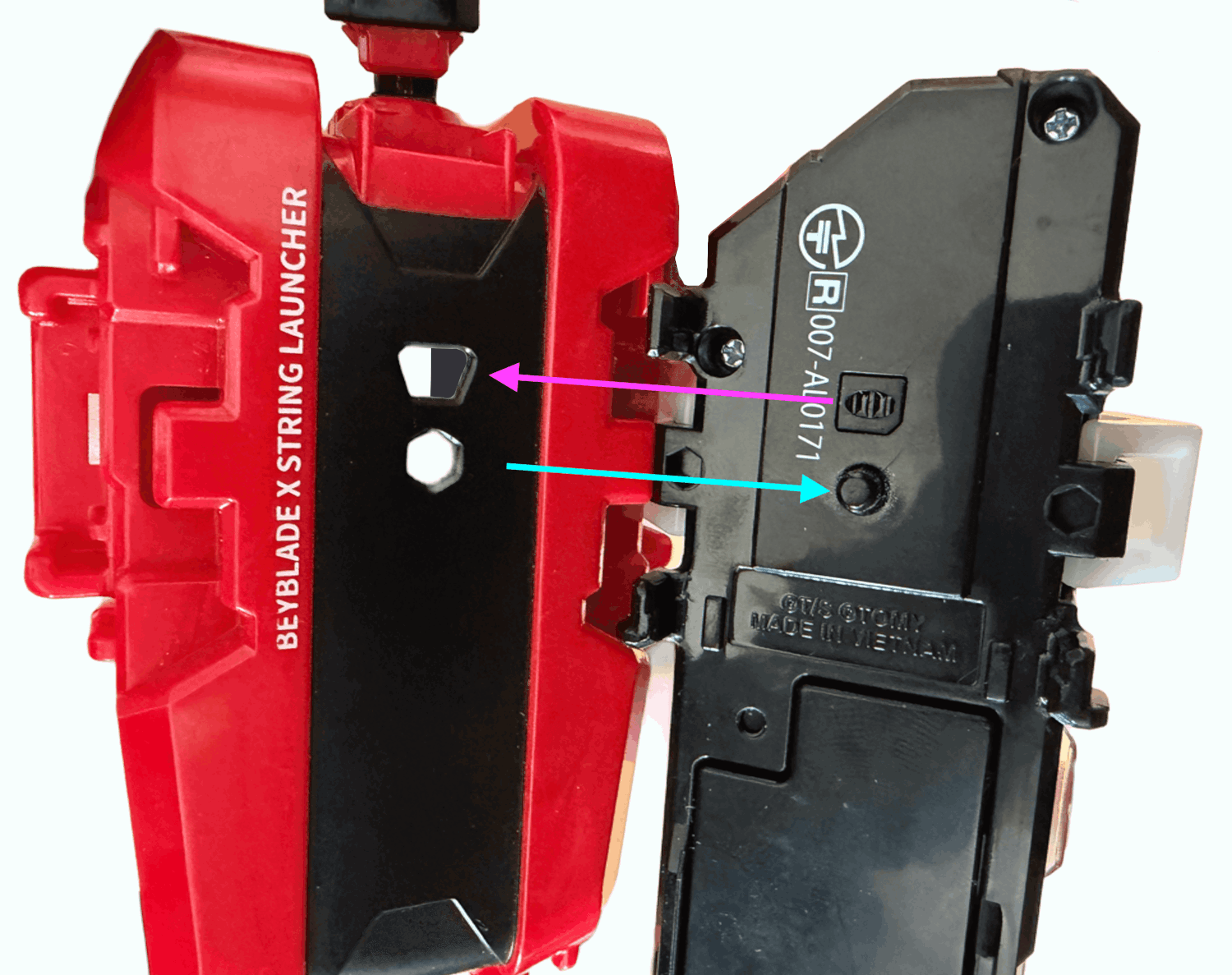
We can now align the components shown in the picture above and work out how they interact. When the small white lever is pushed upwards, sliding into the Beybattle Pass, it signals that a Beyblade is attached to the launcher (see blue arrow). The white lever also acts as a button, turning on the Beybattle Pass and activating a sensor (purple arrow). This sensor detects how quickly the black-and-white disc spins as the launcher string is pulled.
From the video above, I was able to identify what appears to be an infrared sensor using my phone's front-facing camera. My theory is that the sensor tracks the rotating disc by detecting changes in the reflected infrared signal, allowing the Beybattle Pass to calculate the Shoot Power value. In the video, I'm simulating a Beyblade being attached to the launcher to demonstrate how the lever activates the sensor.
Analyzing the Bluetooth payloads
When the Beybattle Pass arrived, I immediately powered it on with a long press, then entered pairing mode by holding the button down again until the lights started blinking. The device BEYBLADE_TOOL01 popped up on my screen. Assuming it wasn't my neighbour's Bluetooth speaker, I connected to it and watched the blinking lights finally stop. I fired up LightBlue and PacketLogger and started sniffing the Bluetooth traffic. I was worried I'd need the official Beyblade X app, but it turned out I could capture launches without it.
After connecting to the device I got the following characteristics:
0x55c4f002f8eb11ecb9390242ac120002
Read and Notify

0x55c4f001f8eb11ecb9390242ac120002
Write without Response
At first, I thought, "Ok, this structure looks simple enough." I subscribed to the Read and Notify characteristics, but nothing happened. Then I wondered: what would happen if I connected the Beybattle Pass to the launcher and attached a Beyblade? Almost immediately, I noticed an orange LED lighting up.
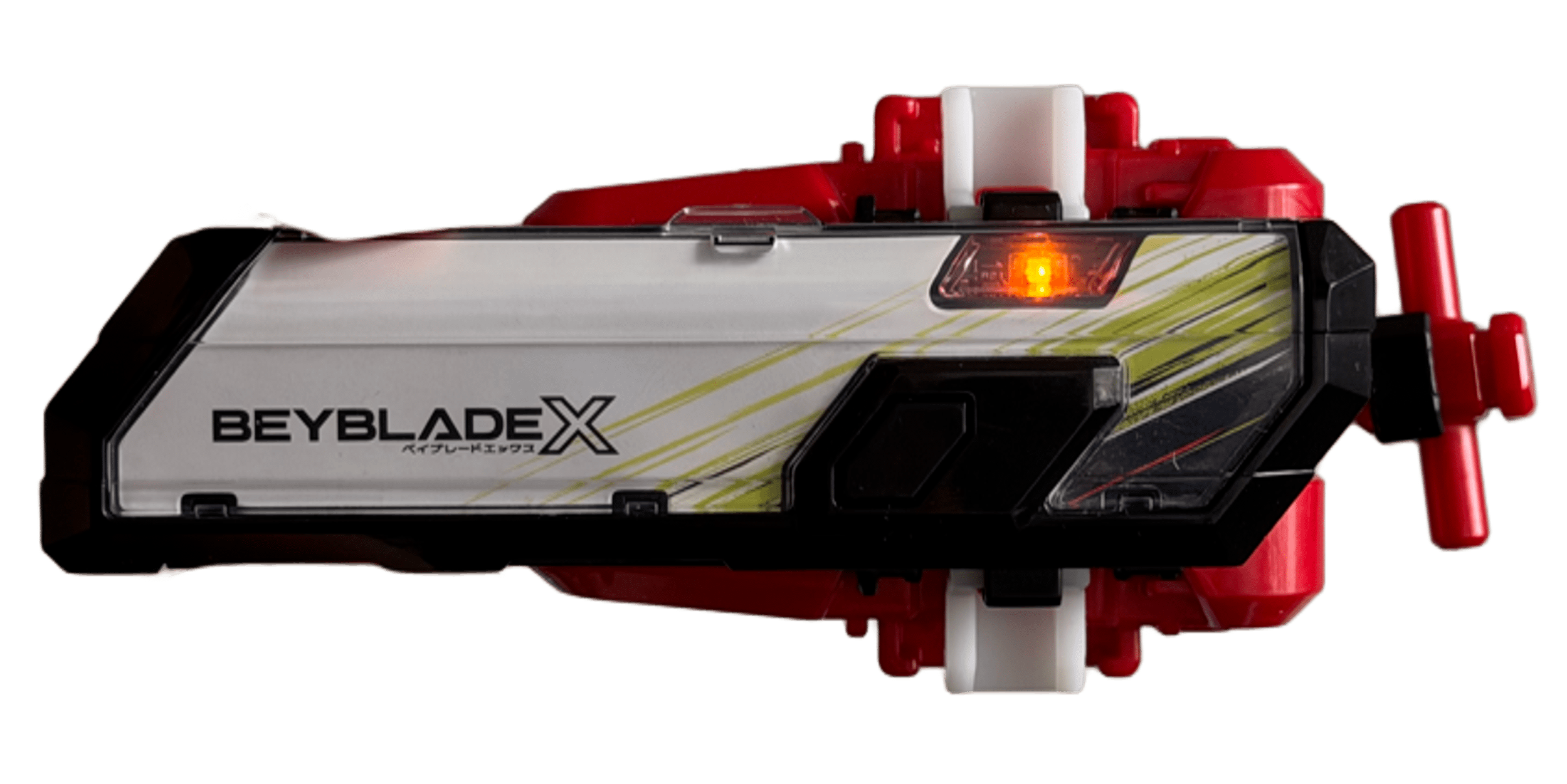
Houston we got something!
a0 3a 00 04 ff 00 00 00 00 00 00 35 b4 04 51 c4 da
After receiving this initial, tiny payload, I had no idea what I was looking at. But when I launched the Beyblade, I received the following, much larger payload:
a0 3a 00 00 ff 00 00 a2 0c 01 00 35 b4 04 51 c4 da
b0 a2 0c 00 00 00 00 00 00 00 00 00 00 00 00 00 00
b1 00 00 00 00 00 00 00 00 00 00 00 00 00 00 00 00
b2 00 00 00 00 00 00 00 00 00 00 00 00 00 00 00 00
b3 00 00 00 00 00 00 00 00 00 00 00 00 00 00 00 00
b4 00 00 00 00 00 00 00 00 00 00 00 00 00 00 00 00
b5 00 00 00 00 00 00 00 00 00 00 00 00 00 00 00 00
b6 00 00 00 00 00 00 a2 0c 01 00 01 00 00 00 00 00
b7 00 00 00 00 00 00 00 00 00 00 00 00 00 00 00 5e
70 f2 28 ef 0c cc 09 0f 09 6e 0b 67 0b 73 29 35 13
71 34 0d e5 0a 00 00 00 00 00 00 00 00 00 00 00 00
72 00 00 00 00 00 00 00 00 00 00 00 00 00 00 00 00
73 00 00 00 00 00 00 00 00 00 00 00 00 00 00 00 00
After performing a few more launches, I noticed a consistent pattern: an initial 17-byte header was always followed by a much larger payload once a Beyblade was launched. Starting with the larger payload, I noticed that its first bytes always followed the same structure: a0, b0 through b7, and then 70 through 73. These looked like page tags to me, so I needed to carefully analyze the data that followed each one.
Looking at the a0 page, I noticed that the tenth byte increased by one with every launch compared to the corresponding byte in the a0 page of the header payload. Easy enough! This was probably some kind of launch counter, incremented whenever a launch was successful. Next, the sequence 35 b4 04 51 c4 da remained constant across captures. This turned out to be the BLE device's address in reverse byte order. I was still trying to understand why bytes 8 and 9 (a2 0c) appeared to be copied into the b* pages.
Decoding the launches
After launching a few more times the chunky payload looked like this:
a0 3a 00 00 ff 00 00 62 10 03 00 35 b4 04 51 c4 da
b0 a2 0c 62 10 95 0d 00 00 00 00 00 00 00 00 00 00
b1 00 00 00 00 00 00 00 00 00 00 00 00 00 00 00 00
b2 ...
I noticed that, with each new launch, a few bytes were appearing in the b* pages: first a2 0c, then 62 10, and finally 95 0d. I tried converting each sequence into a decimal number, but the results were enormous. Like the value a2 0c, came out as 41,484. That couldn't possibly be an RPM value! :)
After searching online, I found that an average Beyblade launch could reach around 5,000 RPM. I decided to try swapping the two bytes in a2 0c, giving me 0c a2, which converted to 3,234.
That's more like it!
The reason I tried this was that Bluetooth Low Energy (BLE) commonly uses little-endian byte order, where the least significant byte comes first. This made sense, so I had finally managed to decode the actual launch values. Now, back to the smaller header payload.
As I mentioned earlier, bytes 8 and 9 (e.g. 62 10) from the a0 page would occasionally appear in the b* pages, but their values seemed to change unpredictably. Whenever this happened, the Beybattle Pass would display a different light pattern after the launch. Instead of the usual blinking green , it would flash orange → red → green . Something was definitely different about these launches. But why?!
Decoding the numbers I would have:
0c a2 → 3,234
10 62 → 4,194 🔥
0d 95 → 3,477
AH, that looks like a high score to me, mystery solved!
Remaining bytes in the header
At this point, I had managed to decode the launch values, identify the launch counter, and figure out how the high score was stored. However, a few bytes in the header remained unexplained. During testing, I noticed that whenever I dropped or detached a Beyblade without launching it, the LED would blink red, and the device would return a different header payload:
Payload when attached:
a0 3a 00 04 ff 00 00 02 16 1d 00 35 b4 04 51 c4 da

Payload after being dropped (no launches): <---
a0 3a 00 00 ff 00 00 02 16 1d 00 35 b4 04 51 c4 da

Successfull launch (bulky payload):
a0 3a 00 00 ff 00 00 02 16 1e 00 35 b4 04 51 c4 da,
b0: d6 0f c1 03 88 13 02 16 f0 14 c7 14 4e 11 98 13,
b1: ...
The difference was easy to spot. The sequence 00 04 looked like some kind of status flag, possibly indicating that the device was ready for launch. When a launch failed, these bytes would revert to 00 00, and the launch counter (byte 10) would remain unchanged. However, when a launch was successful, the counter would increase, while the status bytes would read 00 00.
Over the following months, I also noticed that byte 5 (ff, or 255 in decimal, in the a0 page) was steadily decreasing. At the time of writing this post, for example, its value was da, or 218 in decimal. One possible theory is that this byte represents the battery level. However, I still can't explain why its value differs in the larger payload. One day, I'll figure it out...
Launchmaxxing
As the b* pages continued to fill up with data from new launches, my next question was: what happens when we reach the last page, b7? After performing a lot of launches, and by a lot, I mean 50 more, I noticed that the values in page b6 stopped at position 6 (counting from 1), leaving a gap filled with 00 00.
Here's what I mean:
50th launch bulky payload (32 hex):
a0 3a 00 00 ff 00 00 61 16 32 00 35 b4 04 51 c4 da
b0 d6 0f c1 03 88 13 02 16 f0 14 c7 14 4e 11 98 13
b1 18 12 59 0b 1b 10 b3 09 f8 0c 29 0d 88 06 a2 09
b2 a3 0d 3c 0a 22 0b c4 0a 04 01 67 0c 91 0d 4e 04
b3 09 0b 74 03 86 0d 35 0b a0 04 0e 0b e7 13 b3 15
b4 38 05 9e 04 c8 13 61 16 dd 10 2e 15 b5 0e b2 0b
b5 48 0c a6 0c a9 0c 2d 0d 20 0d cb 0d 55 0e 47 0d
b6 bc 0d 36 0d 00 00 61 16 32 00 32 00 00 00 00 00
b7 00 00 00 00 00 00 00 00 00 00 00 00 00 00 00 dc
70 ...

51st launch bulky payload (33 hex):
a0 3a 00 00 ff 00 00 61 16 33 00 35 b4 04 51 c4 da
b0 c1 03 88 13 02 16 f0 14 c7 14 4e 11 98 13 18 12
b1 59 0b 1b 10 b3 09 f8 0c 29 0d 88 06 a2 09 a3 0d
b2 3c 0a 22 0b c4 0a 04 01 67 0c 91 0d 4e 04 09 0b
b3 74 03 86 0d 35 0b a0 04 0e 0b e7 13 b3 15 38 05
b4 9e 04 c8 13 61 16 dd 10 2e 15 b5 0e b2 0b 48 0c
b5 a6 0c a9 0c 2d 0d 20 0d cb 0d 55 0e 47 0d bc 0d
b6 36 0d 2c 13 00 00 61 16 33 00 32 00 00 00 00 00
b7 00 00 00 00 00 00 00 00 00 00 00 00 00 00 00 37
70 ...
FIFO! I screamed while waking the neighbourhood!
It turned out that the maximum number of launches that can be recorded is 50. After that, the oldest entry at the beginning of b0 is discarded, and the new launch value is added to byte position 4 of page b6 (2c 13). After the padding bytes at positions 6 and 7, the same high score showed up again (61 16), followed by the total number of launches (33 00 → 51) and the number of stored entries (32 00 → 50, the maximum).
I couldn't wrap my head around the very last byte on page b7 at first, but it turned out to be a simple checksum. It was calculated by adding together every data byte across the b* pages, skipping each page's tag byte and the checksum byte itself, and then taking the result modulo 256.
Sending data to the Beybattle Pass
So far, I had managed to retrieve quite a lot of information simply by reading the initial characteristic (0x55c4f002). But then I started wondering: what was the other characteristic (0x55c4f001) used for?
Unfortunately, answering that question meant installing the official Beyblade X app and sniffing the Bluetooth traffic directly from my iPhone. The process was quite tedious, especially since I had to install an official Apple Bluetooth debugging profile on my iPhone and keep it connected to my Mac via cable. Once that was done, however, I could finally map out all the interactions.
After inspecting the payloads, I identified three distinct scenarios.
Sending the command 0x74 returned:
b0 a2 0c 71 0f 06 14 f4 13 55 11 88 13 bd 17 23 15
b1 46 13 c9 11 03 0c 1f 0f 46 0e 4d 1b 00 00 00 00
b2 00 00 00 00 00 00 00 00 00 00 00 00 00 00 00 00
b3 00 00 00 00 00 00 00 00 00 00 00 00 00 00 00 00
b4 00 00 00 00 00 00 00 00 00 00 00 00 00 00 00 00
b5 00 00 00 00 00 00 00 00 00 00 00 00 00 00 00 00
b6 00 00 00 00 00 00 4d 1b 0e 00 0e 00 00 00 00 00
b7 00 00 00 00 00 00 00 00 00 00 00 00 00 00 00 0c
That looks like the bulky payload without the 7* pages!
Then 0x51 returned:
a0 3a 00 00 d3 00 00 4d 1b 0e 00 35 b4 04 51 c4 da
And that's the the 17-byte header!
Finally 0x75 returned:
a1 00 00 00
a0 3a 00 00 d3 00 00 00 00 00 00 35 b4 04 51 c4 da
b0 00 00 00 00 00 00 00 00 00 00 00 00 00 00 00 00
b1 00 00 00 00 00 00 00 00 00 00 00 00 00 00 00 00
b2 00 00 00 00 00 00 00 00 00 00 00 00 00 00 00 00
b3 00 00 00 00 00 00 00 00 00 00 00 00 00 00 00 00
b4 00 00 00 00 00 00 00 00 00 00 00 00 00 00 00 00
b5 00 00 00 00 00 00 00 00 00 00 00 00 00 00 00 00
b6 00 00 00 00 00 00 00 00 00 00 00 00 00 00 00 00
b7 00 00 00 00 00 00 00 00 00 00 00 00 00 00 00 00
Damn, looks like I cleared the whole dataset lol
It was immediately clear what kind of operations were available. One returned the full list of launch values, another retrieved the initial metadata and the last one cleared the entire internal database. This final command was also easy to identify because the Beybattle Pass returned an extra a1 page that I hadn't encountered before.
The obscure 7* pages
If you've made it this far, you're probably wondering: what about the 7* pages? Sadly, I don't have much to say about those. To this day, I still haven't fully figured out what the values stored in these pages represent. After plotting them in a spreadsheet, nothing immediately jumped out at me.
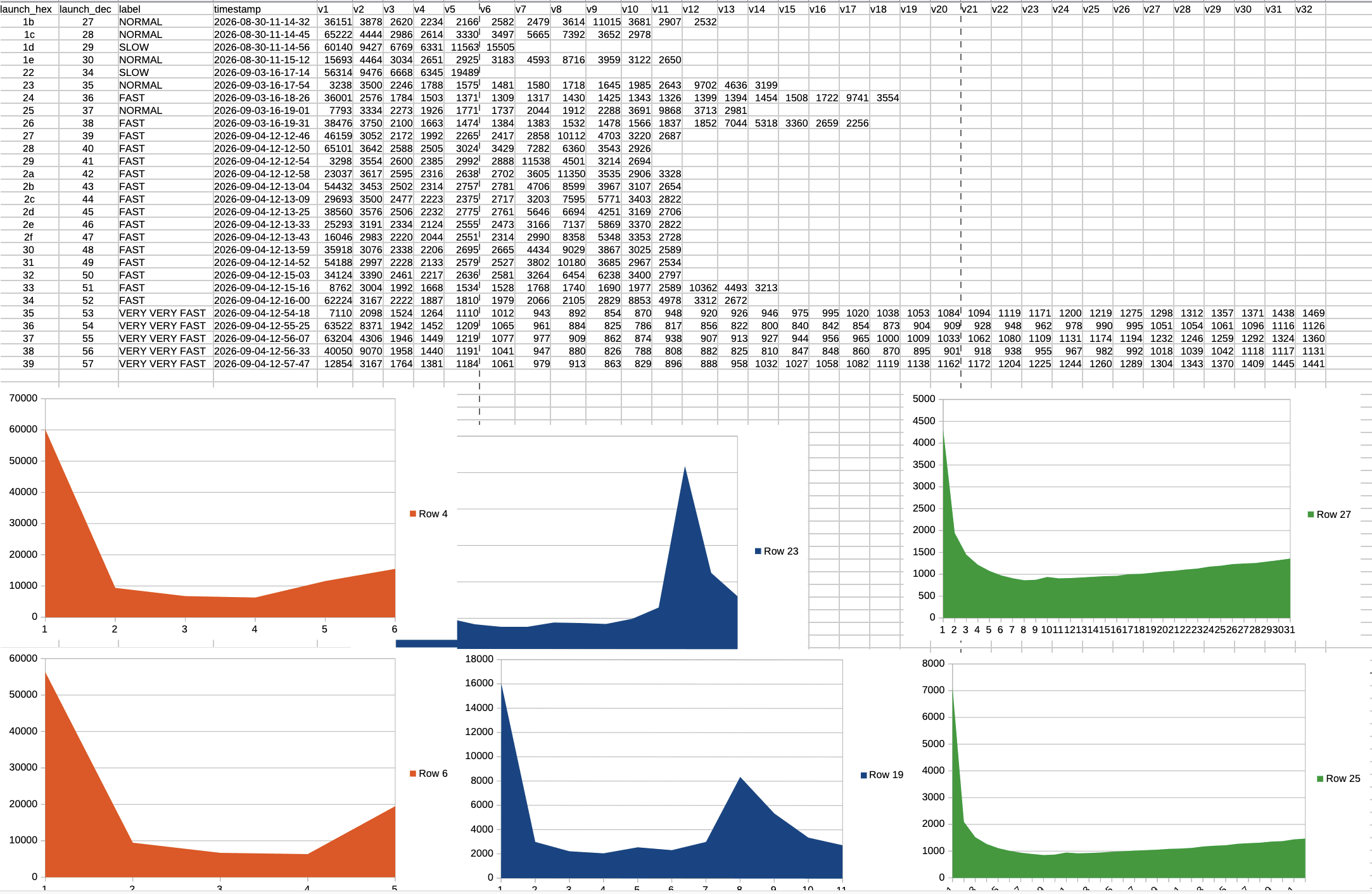
Maybe you guys are smarter than me, but my theory is that these values represent some kind of physical data coming directly from the Beybattle Pass sensor. This would also explain why the 7* pages only appear when a Beyblade is actually launched, rather than when querying the Beybattle Pass using the Write Without Response commands.
Anyway the big part of this reverse job was finally over.
DiZZi 0.2
Of course, I couldn't just stop there. I now had a fully reverse engineered protocol for this nifty little device, which meant I could build my own Bluetooth app, bring it to tournaments, and compete with my friends to see who could achieve the highest spin score.
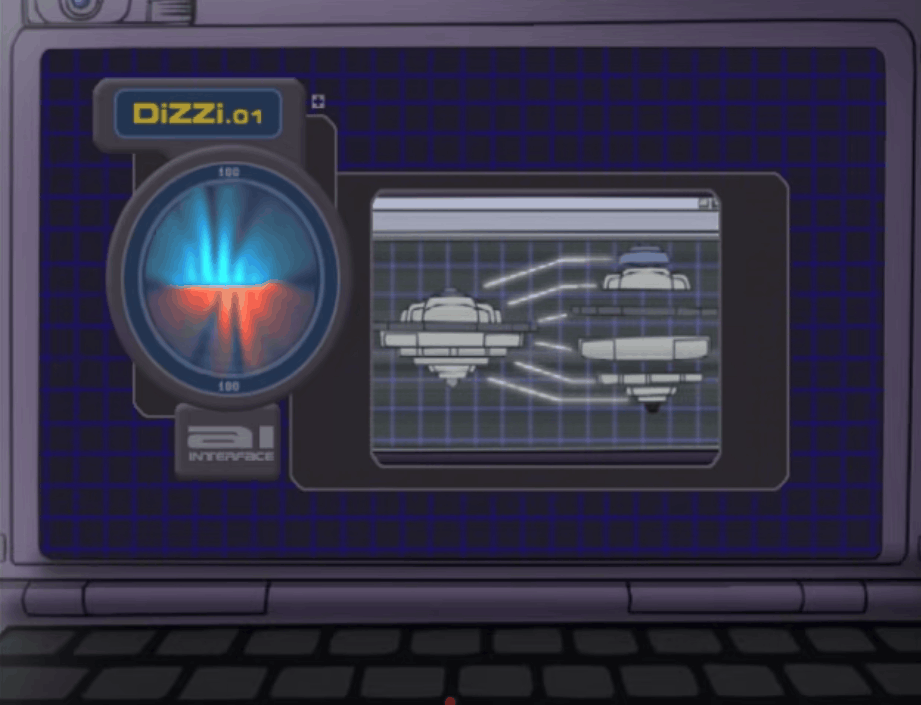
For my favourite part of any project, designing the UI, I already had something in mind. While watching the original anime from the early 2000s, I was immediately inspired to recreate DiZZi 0.1, the AI companion that lived inside Kenny's computer. DiZZi was apparently exclusive to the Western version of the anime. She had a distinctive voice and a sharp, sassy personality, analysing data from Beyblade battles and offering tips to Kenny and his friends while occasionally roasting him.
I started by taking a screenshot of the image above and asking Claude Code to help me sketch out the initial layout. After tweaking the measurements a little, I was able to recreate an almost pixel-perfect design. For the functionality, I leveraged the entire BLE protocol reverse-engineered from Takara Tomy to display:
- Scores after each launch
- A history of previous launches, color-coded by launch intensity
- The highest score
- Battery level
The AI Interface
But I knew I could take this even further! Why not recreate DiZZi itself, complete with its sassy personality, and have it roast my launches and Beyblading skills? After all, we live in the AI era 💀🔫
So, I fleshed out an architecture similar to the one I used for Max Headbox. This time, though, I decided to use Kokoro TTS, with all Ollama requests handled directly by the Express.js server:
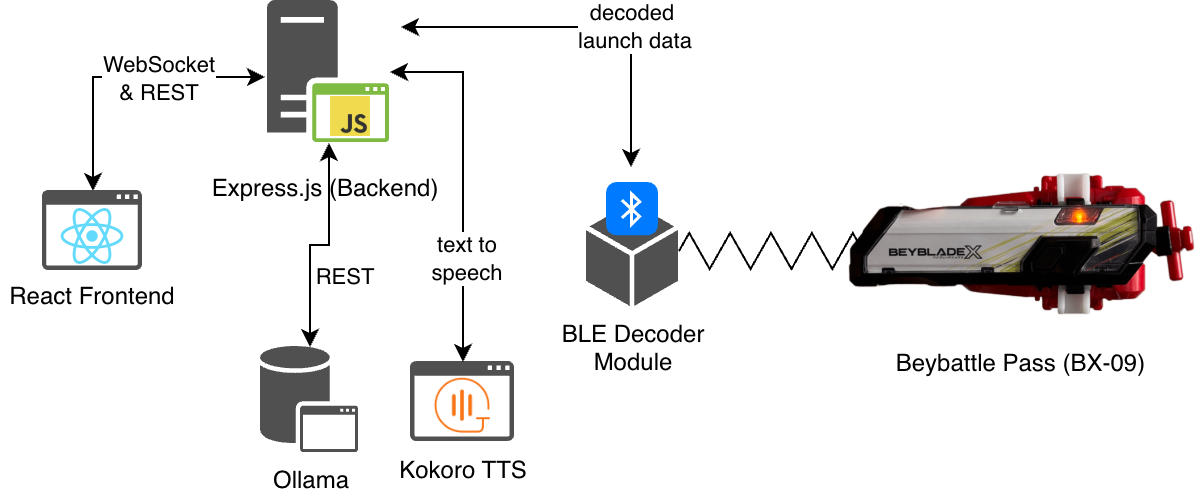
In more detail, the React frontend communicates with the Express.js backend, which connects to the BLE device BEYBLADE_TOOL01 and automatically subscribes to its Notify characteristic. Whenever a new launch is detected, the BLE decoder module retrieves the launch data, and Express.js then queries the Ollama API using the gemma3:1b model to analyze my launch trends. This is all done using a simple prompt like this:
You can roast the player by judging the result or be also be kind to him when the launch power is actually good.
Higher RPM is better: under 3000 is weak, 3000-7000 is alright, over 7000 is excellent.
Reply with ONE short sentence (max 15 words) about how the player's launches are going.
Obviously, this wouldn't be a fully fledged agent (like Max Headbox), but rather a single-turn LLM that activates whenever a new launch event is detected. Small models like gemma3:1b aren't great at math, so instead of putting raw numbers into the prompt, I pre-compute the trend and compose a short summary for it to judge:
function describeLaunches(launchesValues) {
  const lastItem = launchesValues.at(-1);
  const previous = launchesValues.slice(-4, -1);

  if (previous.length === 0) {
    return `First launch: ${lastItem} RPM.`;
  }

  const avgPrevious = Math.round(previous.reduce((a, b) => a + b, 0) / previous.length);
  const diff = lastItem - avgPrevious;
  const trend = diff > 300 ? 'improving' : diff < -300 ? 'getting worse' : 'about the same';

  return `Previous launches: ${previous.join(', ')} RPM (average ${avgPrevious}).
Last launch: ${lastItem} RPM. Trend: ${trend}.`;
}
The main React frontend communicates with the backend over WebSockets to retrieve real-time data from the Beybattle Pass. It also uses a few REST endpoints to trigger the specific Bluetooth commands (0x74, 0x75, and 0x51). When it came to managing the app's state, I wanted to represent the following scenarios, all derived directly from the device's events:
- A Bey is attached
- A Bey is launched
- A Bey is dropped (failed launch)
- The BLE device connects or disconnects
These states also drive the animations of the spinning 3D Beyblade model on the main screen!
The cherry on top of the cake was the VoiceFlare component on the left. Whenever the TTS wav file comes back from the backend, the React frontend plays it through the Web Audio API and pipes it into an AnalyserNode. On every animation frame the analyser returns the frequency spectrum of DiZZi's voice. I keep only the lower ~60% of the bins and use them to drive a small canvas animation: blue and orange flame-like peaks and light streaks mirrored around a glowing horizon, very similar to the sequence from the anime.
const analyser = audioCtx.createAnalyser();
analyser.fftSize = 256;
source.connect(analyser);
analyser.connect(audioCtx.destination);

function tick() {
  analyser.getByteFrequencyData(data);
  // ...map the bins to peaks and streaks, then draw()
  if (!audio.paused && !audio.ended) requestAnimationFrame(tick);
}
Demo
Here's a quick demo of how everything works:
The source code is available on GitHub, along with all the payloads I captured during testing. Feel free to take a crack at the 7* pages and see if you can figure out what they are.
This project was absolutely crazy fun to develop, from reverse-engineering the device all the way to building the app. And, truth be told, I could never have created that amazing spinning 3D Beyblade model or the TTS voice flare on my own, so instructing Claude to help on those components was certainly entertaining!
Sometimes, it's hard to explain to people that my new favorite hobby is spinning Japanese tops. Looking at it objectively, I do wonder whether I'm heading down a weird path in life. But honestly, I've been having an absolute blast over the past few months, so I think it's all g.
Let it rip!